Python 3.14
Pocket Guide
My Python Pocket Guide focuses on the most essential concepts of Python, including multiple paradigms (mostly imperative, procedural, and object-oriented), data types, data collections, and practical use of the Python Standard Library (PSL).
I have been teaching programming and computer science for several years. Although I started learning programming in 2004, my experience with Python started in 2007, when I began using it with the Panda 3D game engine as a hobbyist during high school. Since then, Python has remained one of my favorite scripting languages, especially for automating some game development tasks with Blender and Unreal Engine.

0. Introduction
Python is a general-purpose, high-level, multi-paradigm programming language created by Guido van Rossum, and first released in 1991.
Its philosophy emphasizes code readability and simplicity, summed up in the famous “Zen of Python” you can read in any Python interpreter by typing import this.
In this day and age, Python is one of the most popular programming languages in the world, according to multiple rankings such as the TIOBE index. It powers everything from web backends and data analysis to machine learning, automation, game development, and scientific research.
Behind the scenes, the standard version of Python (called CPython) is built using the C programming language. We say it’s implemented in C.
0.1. Game Dev with Python?
I really don’t know why, but most guides state that Python is used in game development, which isn’t really the case.
Python might be used for simple and small-scale 2D games with libraries like Arcade or Pygame.
For 3D games, Panda3D is probably the most known game engine that uses Python, apart from the deprecated Blender Game Engine (BGE), removed in Blender 2.8 but later revived independently as UPBGE (which is not linked nor maintained by the Blender Foundation).
For AAA games, Panda3D may not match the raw power of engines like Unreal Engine or Unity.
C# with Unity is a good experience that can match Python ease of use, compared to Unreal C++ which is far more complex (often described as lower-level compared to Unity’s C#).
Many also associate Python with the Godot engine, due to its custom scripting language, GDScript, which looks like Python. However, GDScript is not derived from Python, and the two should not be confused.
Finally, Python is used as an automation language, in game engines like Unreal Engine or in 3D DCC like Blender, Autodesk Maya, or Autodesk 3DS Max.
0.2. Note on Generative AI
Generative AI tools such as Claude, Grok, ChatGPT, and Gemini can really help to experiment with Python, but truly learning and memorizing Python basics (syntax, data types, control flow, etc.) is the only reliable way to create complex, scalable, and maintainable projects, in my opinion.
Vibe coding, i.e., generating code via prompts without deeply understanding its logic, will leave problems that will grow. Knowing the language deeply means you can debug, optimize, and extend your code instead of relying on guesswork.
I do believe that generative AI tools are incredible for learning, brainstorming, and finding solutions to fix bugs, but that’s all they are.
1. Getting Started!
1.1. Install Python
To start coding in Python, download the official Python interpreter from python.org. It works on Windows, Linux, and macOS.
- On Linux, Python is often pre-installed!
- On Windows, you can also install Python using Chocolatey, a package manager for Windows.
Still on Windows, make sure to check “Add Python to PATH” during installation.
1.2. Install Visual Studio Code
Download the Visual Studio Code text editor.
Do not confuse it with the Visual Studio (2022 or 2026) IDE.
You may also use other editors (Sublime Text, Atom, etc.) or an online Python interpreter.
In Visual Studio Code, install the following extensions to improve your experience when coding in Python:
Check Python
Check if the Python interpreter is detected by Visual Studio Code by writing this in the terminal :
python --version
On macOS, use this command instead:
python3 --version
Common errors
⛔ python not found Error
Open & close Visual Studio Code. check the ✅ Add Python to PATH checkbox during Python installation. If it wasn’t done, do it manually.
⛔ Execution policy Error
Run Visual Studio Code as administrator and change Execution Policy in PowerShell:
Set-ExecutionPolicy -Scope CurrentUser -ExecutionPolicy RemoteSigned
1.3 Python Interpreter Modes
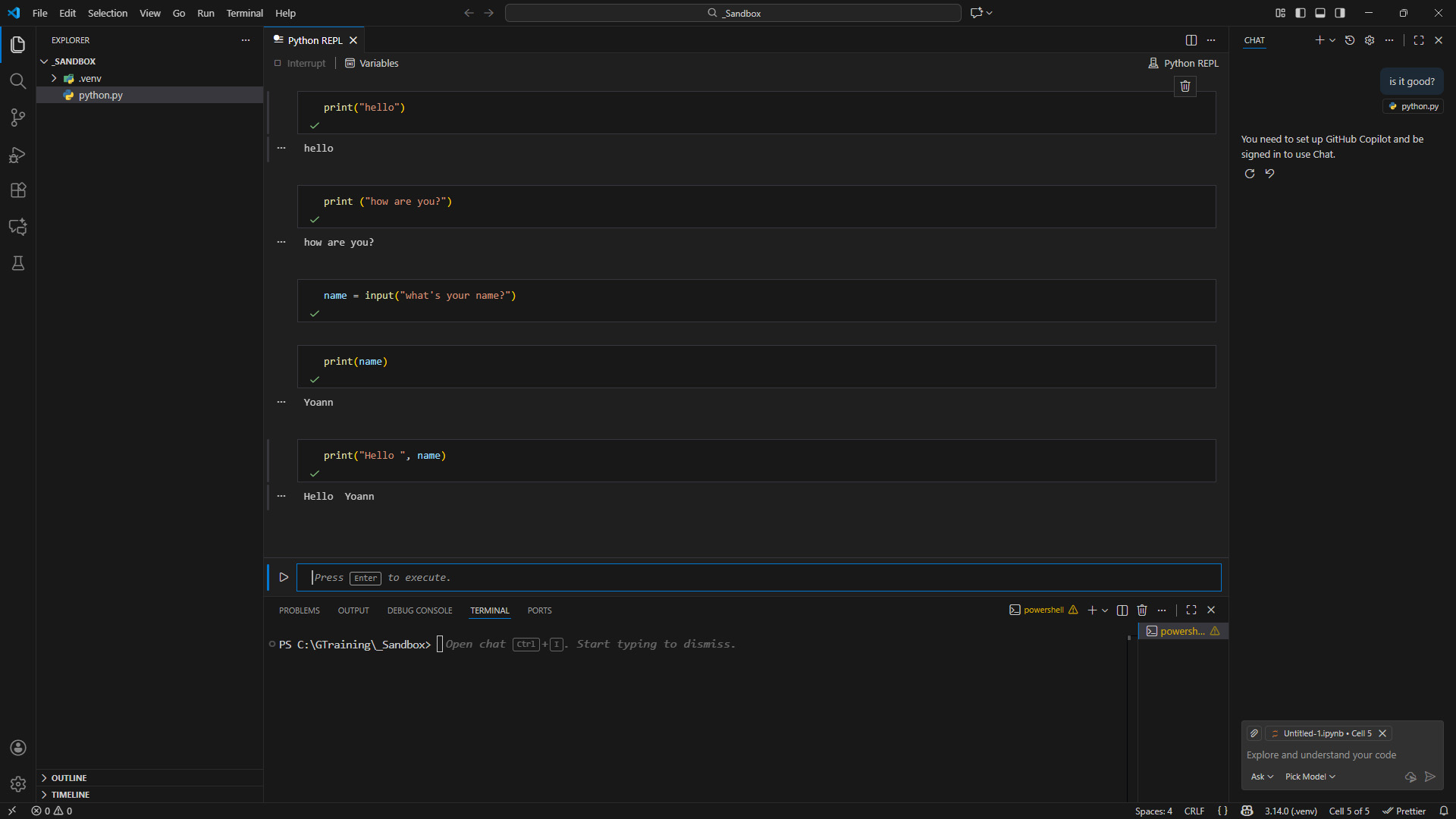
2 ways to run Python code: Interactive Mode and the Script Mode.
Interactive Mode
The Interactive Mode, also known as the REPL (Read, Evaluate, Print, Loop), is mostly used for executing commands quickly. It’s sometimes shown in tutorials where you see 3 angle brackets (>>>) before each Python line.
In Visual Studio Code, use Ctrl + Shift + P and type Python REPL. You can start the native or the terminal version.
>>> print("Hello, World!")Script mode
The Script Mode is used to run .py files with the Python interpreter, allowing you to write and execute entire scripts.
Personally, I only use this mode 😅!
In Visual Studio Code, create a project (folder) and a script called main.py to write the line below.
print("Hello, World!") 1.4. Project Organization
Most Python projects might follow a conventional structure, which I describe below. Obviously, this structure will heavily change based on the type of app you create.
Additionally, frameworks or (game) engines often dictate your project’s structure, while libraries are components you integrate into your project (so you still decide how to structure your project).
📂 src: The Source Code folder contains the main application code and keeps the core logic separated from tests, configs, and other files.
📂 test: The Tests folder contains scripts that verify the application continues to work as new features are added. It can be used with frameworks such as pytest or unittest.
📄 requirements.txt: Lists all external dependencies (libraries or frameworks) your project needs.
📄 README.md: Project overview & usage instructions written in Markdown.
1.5 Virtual Environment
It’s a good practice to create a virtual environment for most Python projects.
It is useful to install packages in a specific environment, rather than on your global Python installation. It is also better if you are working in a team.
To create a virtual environment, run python -m venv .venv on the terminal.
You can replace .venv with any other name to create the folder of your virtual environment.
To activate it on Windows, use the following command:
.venv\Scripts\activate
On macOS and Linux, use this command:
.venv/bin/activate
1.6. Using Pip (Package installer)
Whenever you need to install new packages inside this environment, just use the pip install command. You can install multiple packages at once by separating them with spaces, like pip install package_one package_two.
pip install package_name   # On Windows
pip3 install package_name  # On macOS
You can also check what packages are installed with the pip list command.
pip list   # On Windows
pip3 list  # On macOS
1.7. Conventional Entry Point
Every program has an entry point, which is the first piece of code that runs when execution begins (when the program starts).
However, Python is a bit different from other languages such as C++, as it doesn’t require a main() function to be defined.
However, as highlighted by Real Python, I firmly believe that it is good practice to always include a conventional main() entry point, especially for organizing larger projects or ensuring long-term maintenance.
Because it is conventional, you could use another name for the main function, such as start() or run(), although I recommend sticking with main() 😉!
# Main Function (Entry Point of your Python Program)
def main():
    print("Hello, World!")

# Main Guard
if __name__ == "__main__":
    main() # Call (run) the main function
The Main Guard idiom is actually a way to execute Python instructions only when the script is run directly (when __name__ is automatically set to __main__), and not when it is imported into another script.
1.8. Indentation
Indentation, which refers to the whitespace at the beginning of a line, is mandatory in Python. Unlike languages like C++ or C#, which use curly braces { } to define code blocks, Python relies on indentation to determine block structure.
Thus, Python requires every indented code block to contain at least one statement. The standard indentation level is 4 spaces per block, as recommended by PEP-8.
Placeholders
To define empty code blocks, you can use placeholders like pass or the ellipsis (...) to prevent syntax errors.
pass is a do-nothing statement that is simply ignored by the Python interpreter.
def display_data ():
    pass # Empty code block

if True:
    pass
The ellipsis ... is more than just a placeholder, it’s an actual built-in Ellipsis object. It has additional uses, such as type hints or indicating a variable-length tuple.
from typing import Tuple

def work_in_progress():
    ...  # Placeholder for future implementation

vehicles: Tuple[str, ...] = ("Car", "Truck", "Train", "Subway")
Semicolon
You can use a semicolon (;) to write multiple statements on the same line, but this is not recommended and not considered Pythonic.
print("Hello!"); print("Welcome to my app!");
3. Variables & Built-in Data Types
Variables are like containers for storing and manipulating data, such as numbers, lists, or strings. It’s useful to remember a user choice, for example!
3.0. Variables in Python
Python is dynamically typed, meaning you don’t need to specify the type of data a variable will store beforehand (like an integer or string). The variable type is determined while the program is running (at runtime).
player_name = "Charlotte"  # String (str)
player_score = 100  # Integer (int)
player_is_alive = True  # Boolean (bool)
players = ["Max", "Alicia", "Charlotte", "Shannon"]     # List (list)
Since Python is dynamically-typed, you can change the variable’s type at any time, which offers great flexibility, but can also lead to bugs if you’re not careful 😉.
# Reassigning a variable with a different type
player_name = "Alicia"
player_name = 250   # I changed from string to integer
You can also check any variable’s type with the type() function.
print(type(player_score)) # Result will be class int, meaning integer
Type Hints
Since Python 3.5, you can also use type hints (see PEP 484) to specify the type of a variable using a colon (:) after the variable name.
However, this is optional and will not affect the program’s behavior. They’re simply there for clarity and for tools like linters!
boss_health: int = 100
player_coins: float = 50.0
3.1. Conventions
The PEP-8 Style Guide is the official guide for writing Python code for every Pythonista (a Python programmer).
The goal is to have a worldwide convention for code formatting, ensuring your code is easy to maintain, share, and collaborate on.
I highly recommend following it, especially for larger projects, unless you are working on a project that uses a different style guide (more common in large companies).
However, avoid crafting your own conventions unless it is truly justified 😉!
| Style | Use For | Example |
|---|
snake_case | variables, functions/ methods, files | player_score game.py |
_single_leading_underscore | private/internal elements | _update_health() _hidden_var |
__double_leading_trailing__ | dunder (magic) methods | __init__() __str__() |
UPPER_SNAKE_CASE | constants | MAX_SPEED = 200 |
PascalCase | classes | class Player: class SportCar |
3.2. None Type
The None type represents the absence of a value or a null value.
player_name = None
# Check if a variable value is None
if player_name is None:
    print("Player name is not set!")
3.3. Numeric Types
Python has several numeric types, including integers (int), floating-point numbers (float), and complex numbers (complex).
player_score = 100        # int: whole numbers
player_health = 100.0     # float: decimals
player_position = 3 + 4j  # complex: real + imaginary numbers (rarely used in most apps)
Integers
Integers (int) are whole numbers, positive or negative, without a decimal point. It’s useful to represent things like scores, levels, or lives in games.
Note that integers do not have a maximum value in Python, unlike other languages such as C++.
player_score = 100
bonus = 25 + 25

player_score += bonus     # Now 150
player_score *= 2         # Now 300
player_score = 200        # Set directly to 200

player_magic_points = 100 + bonus
Floating-Point Numbers
Floats are numbers with decimals, useful for precision in values like health, speed, camera distance, or rotation.
player_health = 75.5
player_attack = 25.3
boss_health = 100.0
Complex Numbers
Complex numbers are real + imaginary numbers (with a j for the imaginary part). It might not be useful for most programs, but interesting for some math operations.
complex_nb = 3 + 4j
3.4. Booleans
The Boolean type (bool) is used to represent True or False values. It’s often used in conditional statements and loops.
While booleans are conceptually different from numeric types, they can be treated as integers where True is 1 and False is 0.
is_game_over = False

if is_game_over:
    print("Game Over!")
3.5. Strings
Strings are sequences of characters, enclosed in single (') or double (") quotes.
You can also use triple quotes (''' or """) for multi-line strings.
player_name = "Max"  # Single or double quotes
multi_line = """This is a
multi-line string."""
formatted = f"Player: {player_name}"  # f-string (Python 3.6+)
4. Built-in Collections
From now on, we will explore four (five, actually) collections of data: lists, tuples, sets (plus frozensets), and dictionaries.
| Collection | Mutable | Ordered | Unique Items |
|---|
| List | ✅ Yes | ✅ Yes | ❌ No |
| Tuple | ❌ No | ✅ Yes | ❌ No |
| Set | ✅ Yes | ❌ No | ✅ Yes |
| Dict | ✅ Yes | ✅ Yes* | ✅ Keys |
*As of Python 3.7, dictionaries maintain insertion order.
4.1. Lists
A list is a collection of items (called elements) enclosed in square brackets [] and separated by commas ,. Unlike a single value, a list can hold multiple elements of any data type, such as strings, numbers, or even other lists.
Lists are mutable, meaning that you can change them after creation, and ordered, where each element keep an index or order..
# List creation
inventory = ["Sword", "Shield", "Potion", "Map"]
enemies = [] # Empty list

# Slicing
first_two = inventory[:2]      # ["Sword", "Shield"]
last_item = inventory[-1]      # "Map"
reversed_inv = inventory[::-1] # ["Map", "Potion", "Shield", "Sword"]

# Common Methods
inventory.append("Key")        # Add to the end of the list
inventory.insert(1, "Bow")     # Add at index 1
inventory.pop()                # Remove and return the last item
4.2. Tuples
A tuple is similar to a list but immutable (cannot be changed after creation). It’s still ordered.
Tuples are useful when data should not be modified.
# Tuple creation
player_default_position = (340, 150, 70)
4.3. Set
A set is an unordered collection of unique items, not allowing duplicates. Sets are mutable.
# Set creation
unique_weapons = {"Gun", "Shotgun"}
4.4. Frozensets
A frozenset is an immutable version of a set.
# Set creation
game_description_tags = frozenset(["action", "adventure", "rpg", "open world"])
4.5. Dictionaries
A dictionary (dict) stores key-value pairs. Keys must be unique and immutable, but values can be anything.
# Creation
player = {
    "name": "Alicia",
    "score": 250,
    "alive": True,
    "inventory": ["sword", "potion"]
}

# Accessing safely by preventing KeyErrors
score = player.get("score", 0) # Returns 0 if "score" doesn't exist

# Adding/Updating
player["hp"] = 95              # Update existing
player["mana"] = 50            # Add new key
5. Control Flow
Control flow lets your program make decisions and repeat actions.
5.1. Conditional Statements
The most classic way to make decisions in any programming language!
score = 1420
rank = ""

if score >= 5000:
    rank = "Legend"
elif score >= 2500:
    rank = "Master"
elif score >= 1000:
    rank = "Gold"
else:
    rank = "Bronze"

print(f"You are ranked: {rank}")
Remember that no parentheses are needed, unlike in other languages such as C++.
References
Articles
Basics
Data Types
Books
- Matthes, Eric. 2023. Python Crash Course. 3rd Edition. No Starch Press.
- Sweigart, Al. 2020. Beyond the Basic Stuff with Python. No Starch Press.
- Sweigart, Al. 2025. Automate the Boring Stuff with Python. 3rd Edition. No Starch Press.